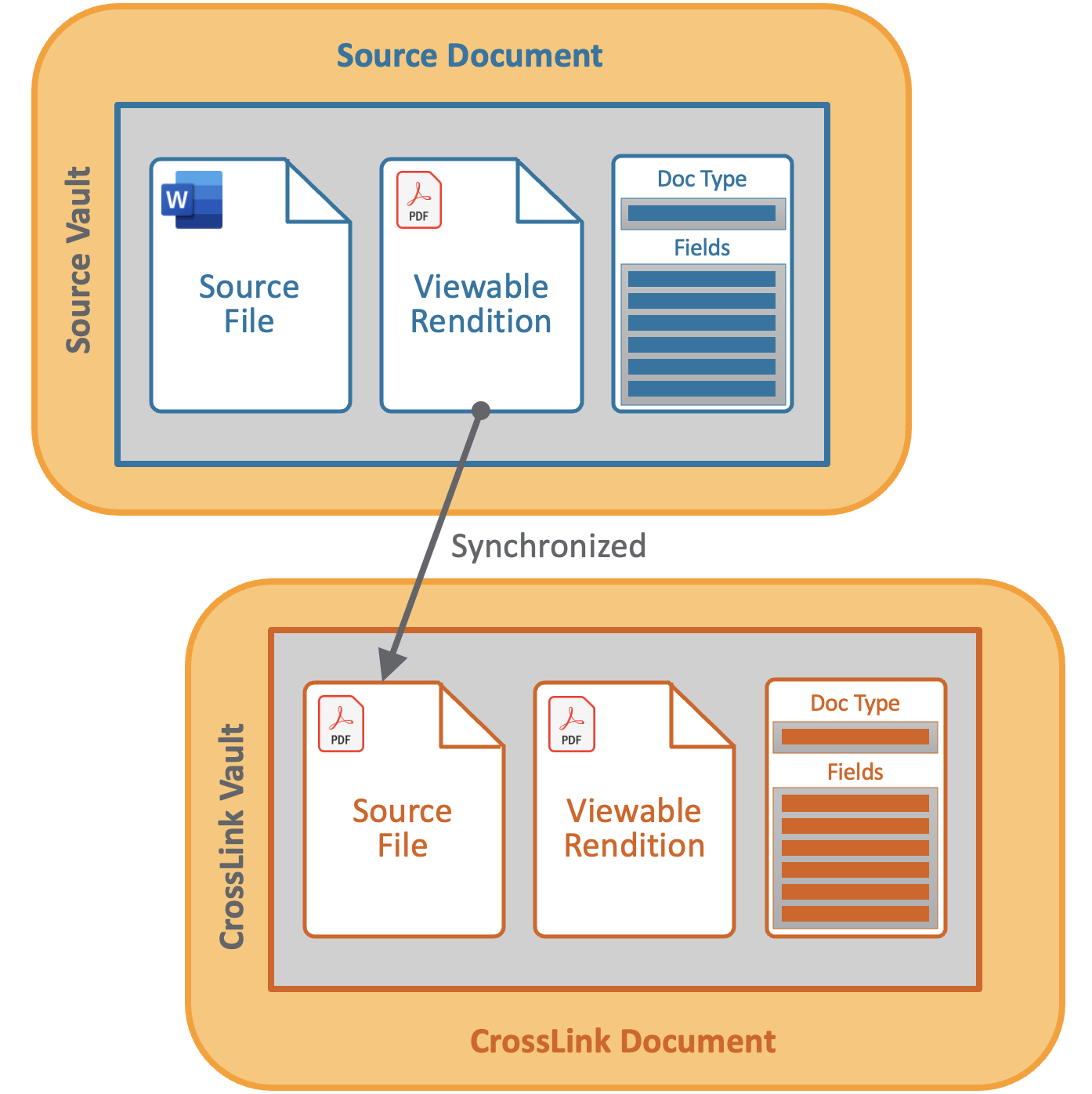
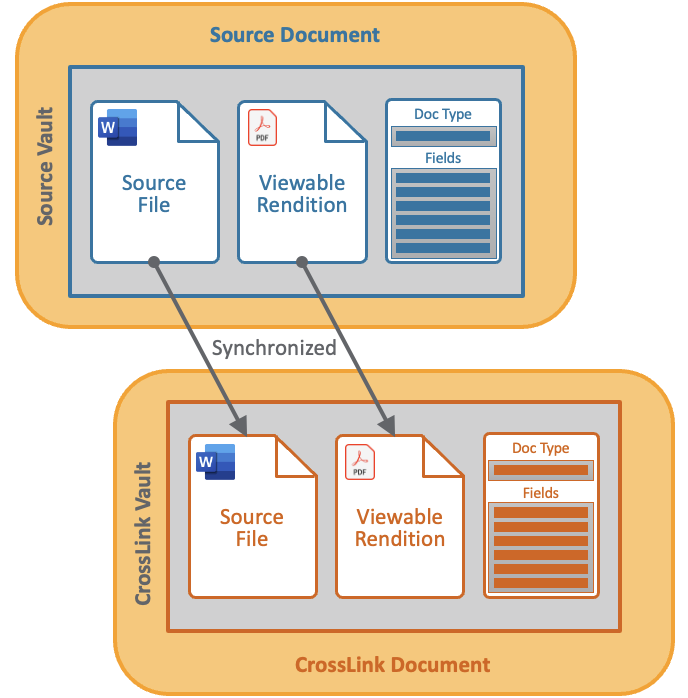
CrossLinks (CrossLink documents) enable content from one Vault to be used in another Vault within the same domain. A CrossLink document in your Vault is linked to a source document, which is a different document in another Vault. Depending on the CrossLink’s document type configuration, a CrossLink document can pull the rendition of the source document, or both the rendition and the source file of the source document.
CrossLinks support seamless cross-Vault business processes in a controlled manner by allowing users to interact with content within their specific business context without needing to know how the content is used elsewhere in the organization.
CrossLinks provide a single source of truth for content in Vault by eliminating the use of uncontrolled copies of documents when content from one Vault is needed in another.
A CrossLink document in your Vault uses your Vault’s fields, lifecycle, and workflows; the only data that is linked from the source Vault is the rendition, or rendition and source file, of the CrossLink document. When content in the source document is updated or a new version is created, the CrossLink is automatically updated in your Vault.
In the following example, the CrossLink document was created using the source document’s rendition only:
In the following example, the CrossLink document was created using the source document’s source file and rendition:
Key Concepts
- Source Document: The original document which exists in another Vault (the source Vault). The viewable rendition of the source document is used to create the CrossLink in your Vault (the CrossLink Vault).
- CrossLink: A document in your Vault which uses the copy of the viewable rendition of a source document in another Vault. CrossLinks inherit a subset of fields from the source document but have their own document type, lifecycle, and workflows, which are separate from those of the source document.
- Source Vault: Where the source document exists. The source Vault must be in the same domain as the CrossLink Vault. To create a CrossLink document in the CrossLink Vault, you must have access to the source Vault.
- CrossLink Vault: Where the CrossLink exists and the source document is being leveraged.
- Source Binding Rules: CrossLinks can be statically bound to a specific version of the source document or dynamically bound to the latest version or latest steady state version of the source document. When changes are made to the source document, the CrossLink is automatically updated.
- Cross-Domain CrossLink: A CrossLink that spans a SourceVault and CrossLink Vault that reside within separate domains. Cross-domain CrossLinks are bound to a specific Vault-to-Vault connection. If the connection is disconnected, the CrossLink is no longer automatically updated.
Working with CrossLink Documents
See Adding, Editing & Working with CrossLinks for information on creating and managing CrossLink documents.
Source Document Details on CrossLink Documents
In the CrossLink Vault, the Source Document Details section in the Information panel on the Doc Info pane display information about the source document bound to the CrossLink. A CrossLink can be bound to only one source document. Vault automatically updates the fields in the Source Document Details section as the source document changes. If you do not have access to the source Vault where the source document is located, you cannot edit the Source Document Details information, and the Source Vault Name and Source Link fields are left blank when the automatic update occurs.
The following fields are displayed in the Source Document Details section on the Doc Info pane:
- Source Vault Name: Name of the source Vault.
- Source Vault Connection Name: Name of the Vault-to-Vault connection to which the CrossLink is bound. This field is displayed for cross-domain CrossLinks only.
- Source Document Name: Name of the source document.
- Source Number: Document number of the source document.
- Source Binding Rule: Binding rule applied to the CrossLink document. You can edit the binding rule if you have access to the source Vault.
- Bound Source Version: Current version of the source document bound to the CrossLink document. For dynamic binding, this is the version number of the source document to which the CrossLink is currently bound.
- Latest Source Version: Latest available version of the source document.
- Source Owner: Owner of the source document.
- Source Link: Link to the source document in the source Vault. Click the link to view the source document.
- Link Status: The status of the link to the source document in the source Vault: Active, Deleted, or Obsolete. When the document is moved from the Obsolete state to another state, the Link Status does not update automatically. You can fix this with a manual re-sync.
- CrossLink Source Type: Displays whether the CrossLink document is linked to the source document’s rendition only, or both the source file and rendition. Rendition indicates that the source document’s viewable, video, or audio rendition is used as the CrossLink document’s rendition and source file. Source File and Rendition indicates that the source document’s source file is used as the CrossLink document’s source file, and the source document’s viewable, video, or audio rendition is used as the CrossLink document’s rendition.
CrossLinking CrossLinks
CrossLinks can be CrossLinked themselves in the same way as any other eligible document. When referring to CrossLinked CrossLinks, the following terms may be used:
- Primary Vault: The Vault where the document is originally created
- Secondary Vault: The Vault where the CrossLinked document is created
- Tertiary Vault: The Vault where a CrossLinked CrossLink is created
CrossLink Document Details on Source Documents
In the source Vault, the Related CrossLinks section in the Relationships panel on the Doc Info pane displays information about the CrossLinks bound to the source document. A source document can be bound to more than one CrossLink.
The following fields are displayed in the Related CrossLinks section on the Doc Info pane:
- CrossLink Document Name: The name of the CrossLink document. Click the name to view the CrossLink.
- CrossLink Document Number: Document number of the CrossLink document.
- CrossLink Vault Name: Name of the Vault that contains the CrossLink document.
- CrossLink Domain: Domain of the CrossLink document. This is displayed for cross-domain CrossLinks only.
- Vault-to-Vault Connection: Name of the Vault-to-Vault connection to which the CrossLink document is bound. This is displayed for cross-domain CrossLinks only.
- CrossLink Binding Rule: Binding rule applied to the CrossLink document.