# Configuring Document Batch Approval

Batch Approval allows users to batch review and approve documents with less complex lifecycles. Users relate documents to a _Batch_ object record using the new **Create Batch** option within bulk document actions, then send the _Batch_ record through its own lifecycle. Configured entry actions within the _Batch Approval_ lifecycle can update the lifecycle states of related documents.

For information on using this feature after configuration, see <a href="/en/gr/36519/">Working with Batch Approval</a>
.


<div class="note-border alert-info">
  <div class="alert alert-info" role="alert">
    <div><i class="far fa-info-circle"></i></div>
    <div class="alert-text">
      <p><strong>Note</strong>: Multi-Document Workflows provide a more robust set of functionality for reviewing and approving multiple documents at once. If your organization has not yet implemented Batch Approval, we recommend using <a href="/en/gr/50493/">Multi-Document Workflows</a>
.</p>
    </div>
  </div>
</div>


## Setup Overview

The following steps are required to enable and set up Batch Approval:

  * [Enable][2] the Batch Approval feature.
  * Assign the [_Batch Number_ field][3] to the appropriate document types.
  * Update the [document lifecycles][4] to select specific lifecycle states for the _In Review_ and _Rejected_ state types. This is necessary on any lifecycles related to document types can go through batch review and approval.
  * Review and update the [_Batch Approval_ object lifecycle][5]. Create user actions or workflows to move _Batch_ records through different object lifecycle states. Create entry actions to move related documents into new lifecycle states. Create entry criteria to prevent lifecycle state changes if the batch includes documents in certain states.
  * Optional: Create a <a href="/en/gr/23516/">custom object tab</a>
 for the _Batch_ object.
  * Review your Vault's custom security profiles and permission sets to ensure that users who will utilize Batch Approval have [the appropriate access][7], including access to the custom tab.

When Batch Approval is enabled, the **Create Batch** bulk document action automatically becomes available. However, the set of functionality for Batch Approval won't be available before you complete the configuration. We recommend that you perform these configuration steps immediately after enabling the feature.

## How to Enable Document Batch Approval {#enable}

You can enable Batch Approval through the **Bulk Actions: Create Batch** setting. Once enabled, you cannot disable Batch Approval. This feature is automatically enabled on PromoMats Vaults. Enabling this feature makes the _Create Batch_ bulk document action available.

## Batch Number Document Field {#document-field}

_Batch Number_ is a shared document field. It is a multi-select object-type field that references the _Batch_ object. By default, this field is available on _Base Document_.

In many implementations, we recommend that you remove it from _Base Document_ and associate it only with specific document types, subtypes, or classifications that should use batch reviews and approvals. By associating the field with specific document types, you can prevent users from performing batch reviews and approvals on documents with other document types.

<div class="note-border alert-info">
  <div class="alert alert-info" role="alert">
    <div><i class="far fa-info-circle"></i></div>
    <div class="alert-text">
      <p><strong>Note</strong>: This field isn’t on <em>Unclassified</em> documents, meaning that Batch Approval is not available for these documents.</p>
    </div>
  </div>
</div>


If needed, you can also set up field-level security overrides to hide the _Batch Number_ field or make it read-only. With this configuration, users can only add documents to a batch with via the **Create Batch** bulk action and they cannot remove documents from the batch.

## State Types on Document Lifecycles {#state-types}

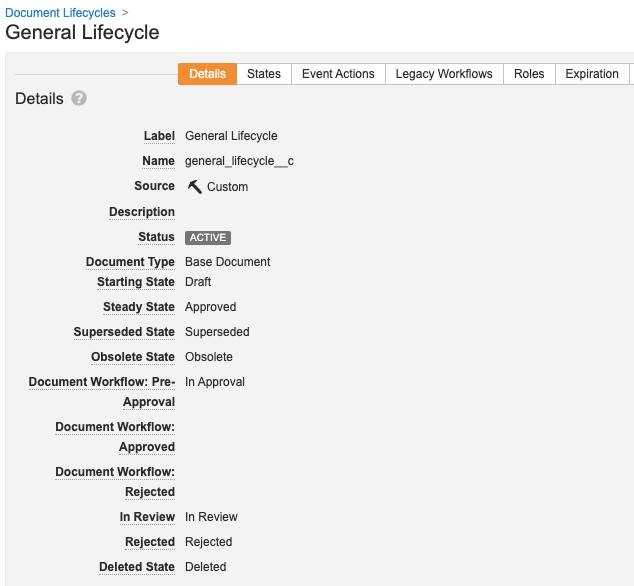
When Batch Approval is enabled, Vault adds the _In Review_ and _Rejected_ state types to all document lifecycles. Admins are not required to select a lifecycle state for these state types generally, but they are required for Batch Approval to work properly. You can find the _In Review_ and _Rejected_ state types on the document lifecycle **Details** page.

<a href="https://platform.veevavault.help/assets/images/State_Types.png" data-lightbox="State_Types.png" data-title="" data-alt="State Types on Document Lifecycles">
  <img class="docimage" src="https://platform.veevavault.help/assets/images/State_Types.png" alt="State Types on Document Lifecycles" style="max-width: 40%;"  />
</a>

You must update every document lifecycle associated with a document type that uses Batch Approval. Assign specific lifecycle states to the _In Review_ and _Rejected_ state types.

## Batch Approval Object Lifecycle {#lifecycle}

This lifecycle automatically applies to the _Batch_ object. You cannot use this lifecycle with any other object and cannot use another lifecycle with the _Batch_ object. The lifecycle includes a set of default lifecycle states, which you can modify as needed.

To configure Batch Approval, you'll need to set up:

  * Either **Change State** user actions or workflows (with related user actions) that move the _Batch_ record between lifecycle states.
  * **Change state of related documents** entry actions for the object lifecycle states. These actions prompt Vault to move all related documents into the document lifecycle states associated with the selected state types.
  * Optional: **Related document state** entry criteria that prevent a state change on the _Batch_ record if documents are in the specified state type, or are not in the specified state type.

<div class="note-border alert-info">
  <div class="alert alert-info" role="alert">
    <div><i class="far fa-info-circle"></i></div>
    <div class="alert-text">
      <p><strong>Note</strong>: <strong>Change state of related documents</strong> entry actions and <strong>Related document state</strong> entry criteria are only valid on the <em>Batch Approval</em> object lifecycle.</p>
    </div>
  </div>
</div>


## Permissions {#permissions}

Like other objects, the _Batch_ object has a set of object record permissions that you can grant to users through security profiles and permission sets. Any users who utilize Batch Approval need **Read**, **Create**, and **Edit** permissions on the _Batch_ object. By default, only the standard _Business Admin_, _System Admin_, and _Vault Owner_ security profiles have the **Create** and **Edit** permissions.

You should not enable Dynamic Access Control on the _Batch_ object.


 [2]: #enable
 [3]: #document-field
 [4]: #state-types
 [5]: #lifecycle
 [7]: #permissions
